Broadcast Settings
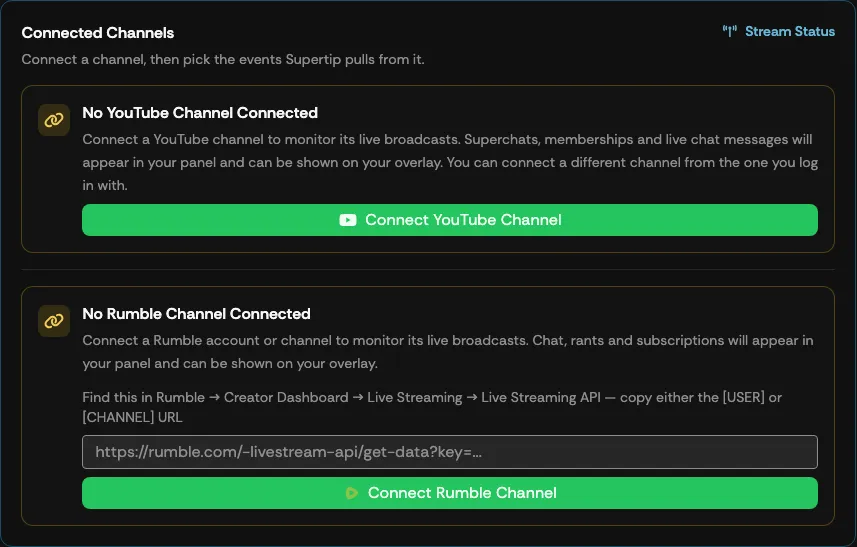
Broadcast Settings is where you connect the platforms Supertip monitors and choose which events it pulls from each one. Supertip watches your connected channels for live broadcasts; while a channel is live, events like Super Chats, Rants, memberships, and chat messages appear in your Panel and can be shown on your overlay, and a Live Chat layer can carry the whole chat feed on stream. To open it, go to the Creator Dashboard and select Settings → Broadcast.
Connecting a YouTube channel
Section titled “Connecting a YouTube channel”To connect a YouTube channel:
- Select Connect YouTube Channel.
- Sign in with Google and choose the channel you want Supertip to monitor.
Superchats, memberships, and live chat are monitored while the connected channel is live.
Connecting a Rumble channel
Section titled “Connecting a Rumble channel”Rumble is connected with a Live Streaming API URL rather than a sign-in — you can connect either your Rumble account or a specific channel:
- In Rumble, go to Creator Dashboard → Live Streaming → Live Streaming API and copy either the [USER] or [CHANNEL] URL.
- Paste it into the URL field under No Rumble Channel Connected.
- Select Connect Rumble Channel.
Chat, rants, and subscriptions are monitored while the connected account or channel is live.
Choosing which events Supertip pulls
Section titled “Choosing which events Supertip pulls”Once a channel is connected, its row shows a Connected badge and a set of event toggles. Only enabled events appear in your Panel.
For a YouTube channel:
| Event | What it includes |
|---|---|
| Super Chats | Paid Super Chat messages. |
| Super Stickers | Paid Super Sticker purchases. |
| Memberships | New and upgraded channel memberships. |
| Membership Milestones | Member anniversary messages (for example, “Member for 6 months”). |
| Gifted Memberships | A viewer gifting memberships to others. |
| Received Gift Memberships | Each viewer who receives a gifted membership. |
| Chat Messages | Regular live chat messages. |
For a Rumble channel:
| Event | What it includes |
|---|---|
| Chat Messages | Regular live chat messages. |
| Rants | Rant superchats. |
| Subscriptions | New channel subscriptions. |
| Gifted Subscriptions | Gifted channel subscriptions. |
| Received Gifted Subscriptions | Each viewer who receives a gifted subscription. |
Disconnecting a channel
Section titled “Disconnecting a channel”Select the disconnect button on a connected channel’s row and confirm the prompt.