
Dashboard Overview
The Supertip Creator Dashboard is the tool you use to access all of your Supertip settings and features. Playing and customizing tips, editing your payment settings, and content moderation are all managed from your Creator Dashboard. This article covers how to open the dashboard, use the panel quick toggles, and read your earnings summary.
Accessing your Creator Dashboard
Section titled “Accessing your Creator Dashboard”To open your Creator Dashboard:
- Open Supertip.gg in your browser.
- If you are not already logged in, select Sign In/Sign Up and choose the login method you used to register your Supertip account (YouTube or X), then follow the login process for that site.
- Once logged in, select your avatar image in the top right corner of the screen.
- Select Creator Dashboard.
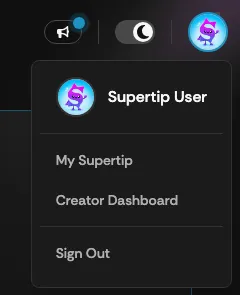
From your Creator Dashboard you have access to all of the settings used to manage your Supertip account.
Enabling and disabling tips with quick toggles
Section titled “Enabling and disabling tips with quick toggles”Quick Toggles let you turn text, voice, and image tips on or off directly from the Panel without opening your full settings.
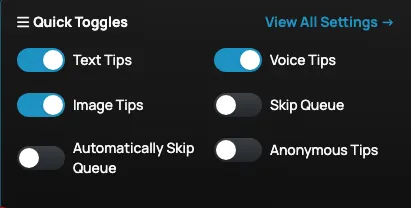
The available quick toggles are:
- Text Tips — allows viewers to send you Supertip text tips.
- Voice Tips — allows viewers to send you Supertip voice tips.
- Image Tips — allows viewers to send you image tips.
- Skip Queue — lets viewers have their tip played instantly, jumping ahead of any tips already in the queue.
- Automatically Skip Queue — automatically plays every voice tip the moment it comes in, instead of holding them in the queue.
- Anonymous Tips — lets people send Supertips without logging in to Supertip first.
Reading your earnings summary
Section titled “Reading your earnings summary”The amount you have earned from your viewers using Supertip is shown in the Earnings Summary section of your Creator Dashboard Panel. Your earnings summary is blurred out by default.
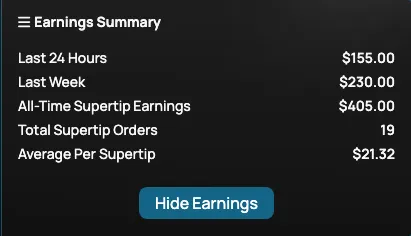
To view your earnings:
- Select Show Earnings.
- Select Hide Earnings to blur the Earnings Summary screen again.
Your Earnings Summary is broken down into the following:
- Last 24 hours — the dollar amount you have earned in the past 24 hours.
- Last Week — the dollar amount you have earned in the past 7 days.
- All-Time Supertip Earnings — the total dollar amount you have earned using Supertip.
- Total Supertip orders — the combined number of Supertip text, voice, and image tips purchased by viewers.
- Average Per Supertip — the average dollar amount you have earned per Supertip.
The figures count paid Supertip text, voice, and image tips from the moment payment goes through, whether or not the tip has been played yet, and they use the same totals as the rest of Supertip, such as your leaderboard ranking. YouTube and Rumble events like Super Chats and Rants are not included.