
Public Page and Trophy Case
Below your connections on the My Supertip screen are two cards that shape how you appear to others on Supertip: your Public Page, and — once you have earned a badge — your Trophy Case.
Public Page
Section titled “Public Page”The Public Page card gives you a permanent tag for your public Supertip page at
supertip.gg/u/<tag>, where visitors can see the badges you’ve earned and the
shows you support.
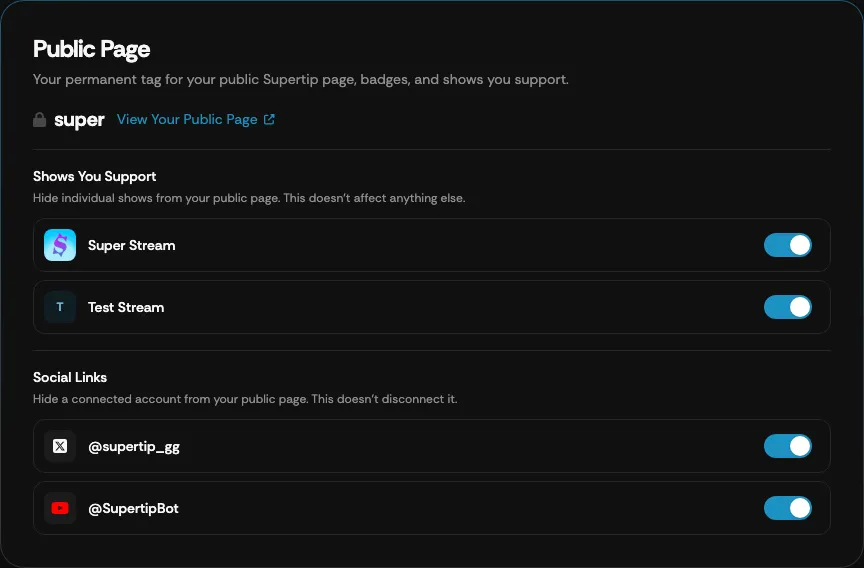
To claim your tag, enter it in the Public Page Tag field and select Claim Tag. Tags are 4–20 letters or numbers.
Select View Your Public Page to open your page. Two groups of toggles control what it shows:
- Shows You Support — switch a show off to hide it from your public page. This doesn’t affect anything else.
- Social Links — switch a connected YouTube or X account off to hide it from your public page without disconnecting it.
Trophy Case
Section titled “Trophy Case”Once you have earned at least one badge from a show, the Trophy Case card appears.
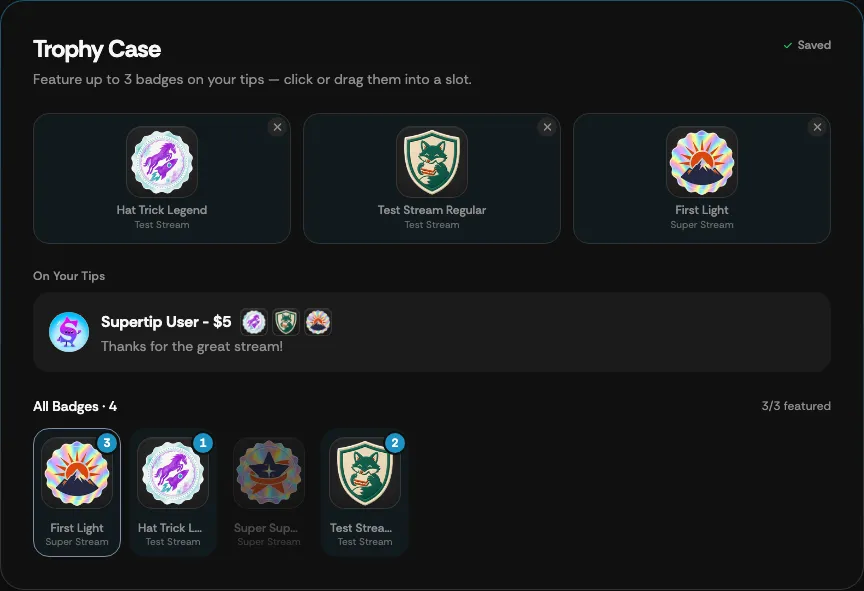
Click or drag up to three earned badges into the slots to feature them. Featured badges appear next to your name on the tips you send (see the On Your Tips preview), on your public page, and in creators’ tipper profile popups. Changes save automatically.
Below the slots, All Badges lists every badge you’ve earned, with a count of how many are featured.
Sharing a badge
Section titled “Sharing a badge”On your public page, select any badge to open it. The badge shows the show it came from, the date you earned it, and how many viewers have earned it. When you’re viewing your own page, Share This Badge opens a share sheet with Share…, Share to X, and Copy link. The link unfurls as a badge card on social platforms and brings visitors straight to that badge in your trophy case.