
Connecting a Stripe Account
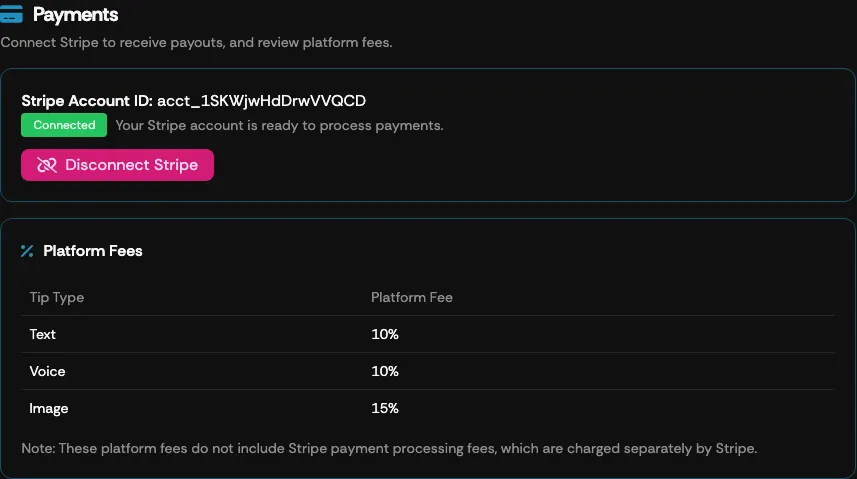
The Payments screen is where you connect or disconnect a Stripe account for your Supertip account. Connecting Stripe is what lets viewers send you voice, text, and image Supertips.
To open your payment settings from the Creator Dashboard, select Settings → Payments.
Connect your Stripe account
Section titled “Connect your Stripe account”There are two ways to connect, depending on whether you already have a Stripe account:
- Connect Existing Stripe Account — sign in to Stripe and authorize Supertip to use your existing account. Payouts go to that account, and if it is already active with Stripe, it connects immediately.
- Create New Stripe Account — Supertip creates a Stripe account for you and sends you to Stripe’s own onboarding pages to enter and verify your details.
To connect Stripe to your Supertip account:
- Select your country information for receiving tips from the drop-down list.
- Select Connect Existing Stripe Account or Create New Stripe Account.
- Follow the instructions given by Stripe; when you finish, you are returned to the Creator Dashboard’s Settings area.
- Once the process is complete, your Stripe Account ID appears on the Payments screen, and viewers can send you voice, text, and image Supertips.
Platform fees
Section titled “Platform fees”The Payments screen also shows the fees related to using Supertip. These fees are charged per tip and vary based on the type of tip the viewer purchases.
Disconnecting your Stripe account
Section titled “Disconnecting your Stripe account”The Payments screen also lets you disconnect the Stripe account linked to Supertip.